
See recent unfollows, one-sided follow relationships, and day-to-day account movement in one place.
Instagram reports and tracker app
See who left, who keeps watching, and where attention is shifting.
Reports is an Instagram tracker for follower changes, profile viewers, story activity, audience snapshots, ghost followers, and not-following-back lists. Use this page to understand the product first, then open the separate Plans page only when you are ready to compare Pro access.
-
Track follower changes faster Check unfollows, one-sided follows, and account movement without turning a quick account review into busywork.
-
Spot audience intent earlier Use repeat viewers, story activity, and profile visits to catch attention before it fades.
-
Upgrade on a separate page Plans, payment result, and purchase lookup stay off the homepage so the product story stays easier to scan.
Quick daily checks, cleaner audience signals, and an easier path into Pro when you want it
At a glance
Start with the product value, then decide whether Pro is worth opening the Plans page.
Follower changesCatch unfollows and account movement faster.
Story activitySee repeat viewers and shifting attention earlier.
Separate Pro flowView plans, buy, and recover purchases on their own dedicated pages.
Follower changes
Catch account drops before they turn into a bigger pattern.
Separate Pro pages
Use the homepage to understand the app, then open Plans only when you are ready to pay.
Check repeat viewers, profile viewers, quieter ghost-follower patterns, and audience movement without turning a quick review into a long workflow.
Pricing, payment, and purchase recovery live away from the homepage so the product story stays cleaner.
Buy on web, receive the code after payment, and redeem it on iPhone through the App Store.
Why it helps
See audience shifts sooner, and know what to do next.
Reports is built for creators who want an Instagram reports and tracker app for follower movement, story activity, profile viewers, ghost followers, and follow cleanup across the account.
Catch account movement before it blurs together.
Use a short daily check to see whether your account is steady, slipping, or starting to turn around.
- Review follower changes in one focused check-in
- Spot quiet churn earlier
- See where cleanup or follow-up matters
Know who keeps coming back, not just who tapped once.
Repeated attention is often more useful than a one-off spike when you are trying to understand what is actually landing.
- Watch recurring profile visits
- Check which stories keep attention
- Focus on patterns instead of raw counts
Understand what the app helps with before you ever look at pricing.
That split keeps the homepage focused on fit, while the separate Plans page handles the transaction work when you actually want it.
- Review the product without pricing noise
- Open Plans only when you are ready to compare access windows
- Use Find Purchase later if an order ever needs recovery
Key features
The screens you will actually use.
Reports is built around the checks creators make most often: follower changes, story activity, profile viewers, audience snapshots, ghost-follower style cleanup, and not-following-back lists.
Follower shifts
Catch account drops before they feel random.
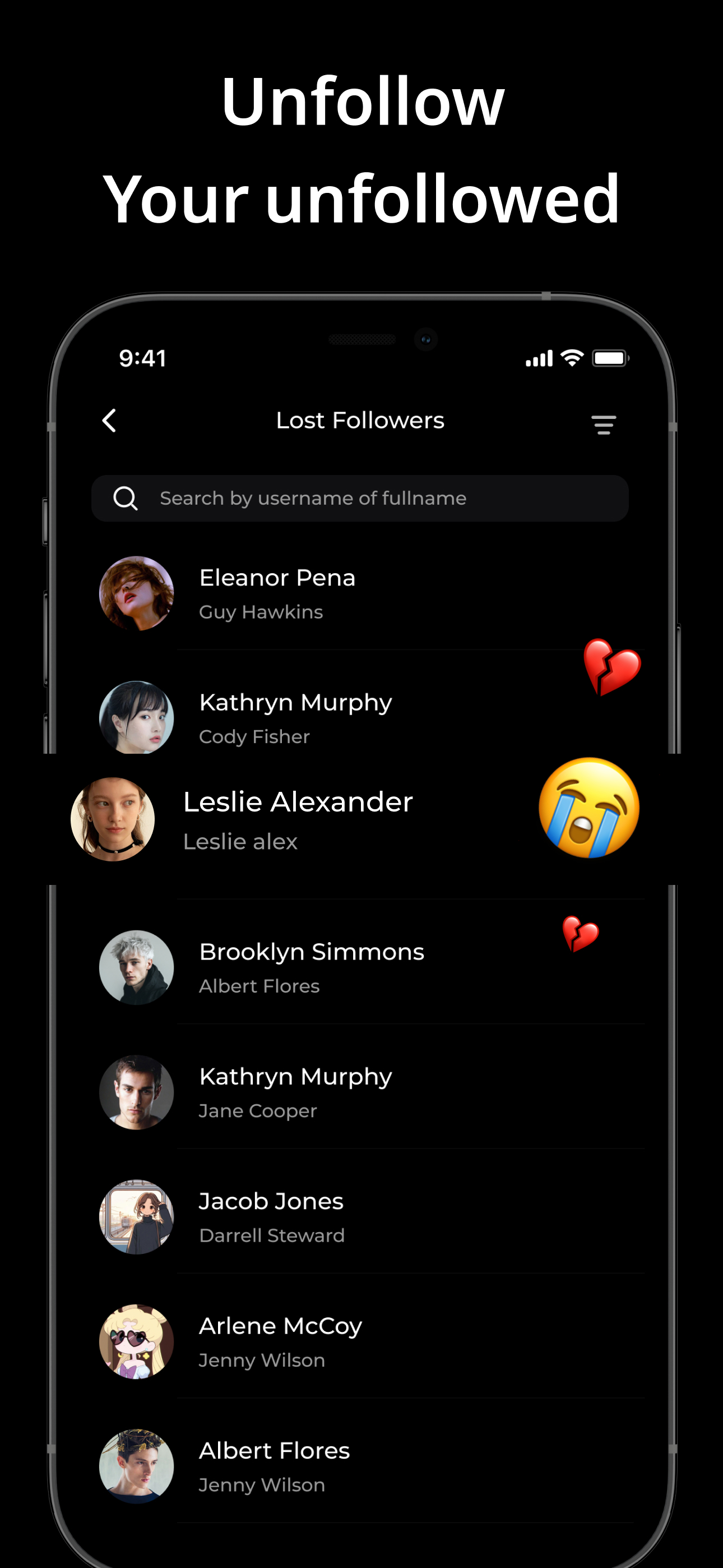
See recent unfollows and account movement quickly so you can tell whether a change is small noise or something worth watching.
- Review recent unfollows in one place
- Spot whether change is isolated or becoming a trend
- Turn account movement into a quick daily check-in
Useful for a fast morning check or a post-campaign review.
Story signals
See which viewers keep coming back.
Story activity is more useful when you can see repeat attention, not just a top-line count that disappears after a few hours.
- Check ongoing viewer patterns faster
- Find story behavior worth following up on
- Use repeat attention as a creative signal
Useful when you are testing formats, timing, or story cadence.
Audience snapshot
Read the account signal mix without opening five different screens.
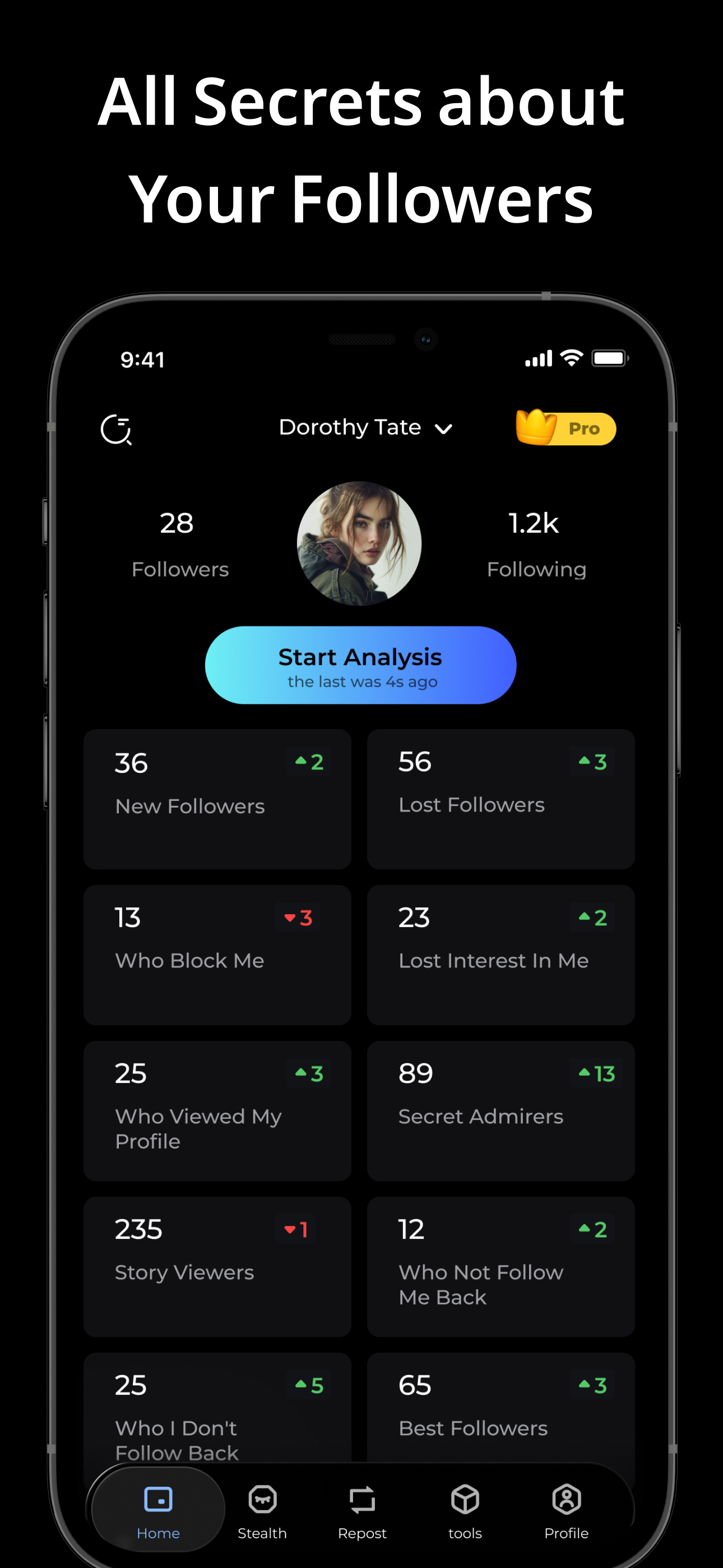
Bring follower movement, profile viewers, and your core account signals into one view before you decide what to do next.
- See high-level audience movement quickly
- Review profile viewers and key follower signals together
- Get a clear read before you decide what to do next
Start here when you want a quick read before diving deeper.
Follow cleanup
Handle one-sided relationships with less manual checking.
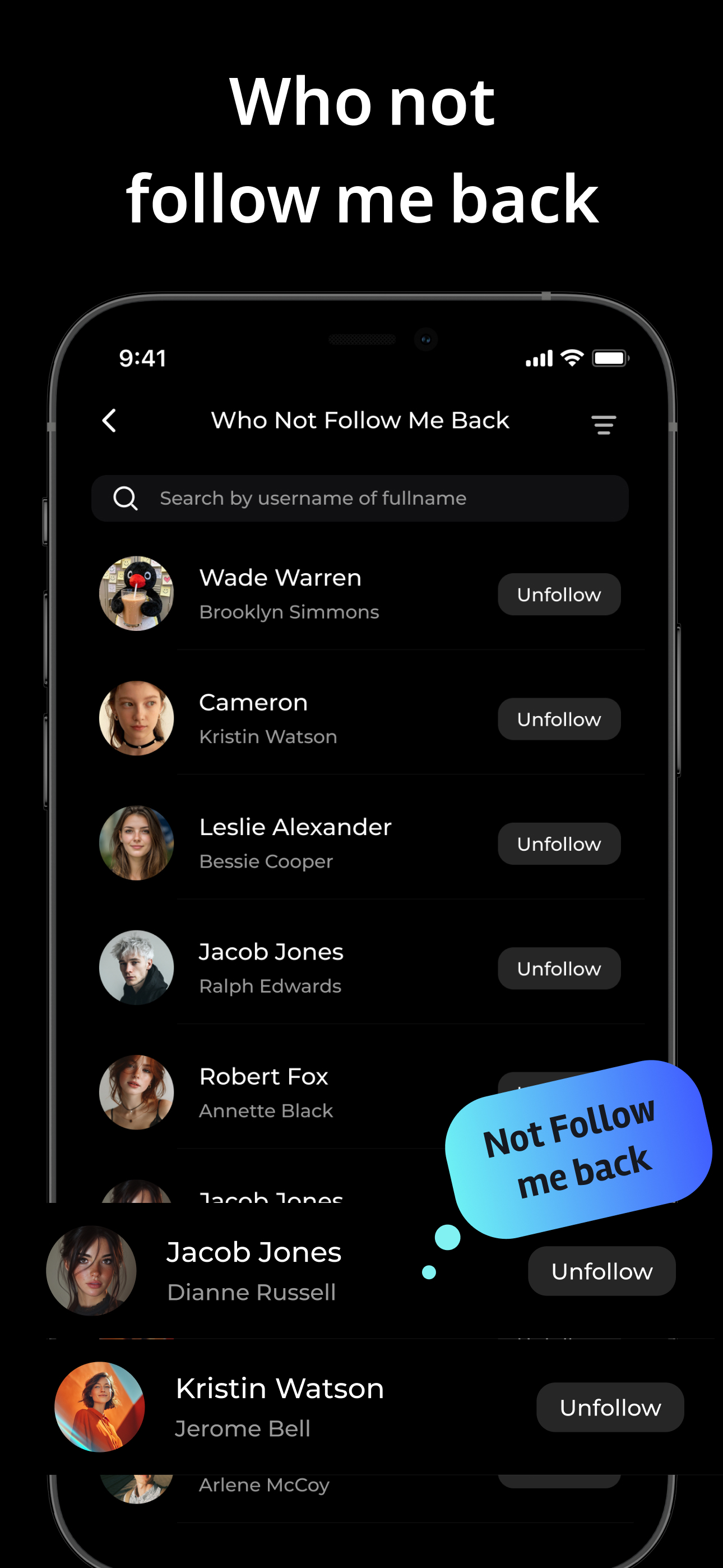
Review who is not following back in a clearer list so cleanup decisions feel quick instead of annoying.
- Review who is not following back
- Support cleanup decisions with a clear list view
- Keep the value concrete for first-time visitors
Useful when you want a cleaner follow graph with less manual checking.
Search intent
Common Instagram tracker searches, explained without the hype.
People search for profile viewers, ghost followers, who blocked me, secret admirers, and who is not following me back. Reports is strongest when it focuses on the visible Instagram signals creators can actually review and use.
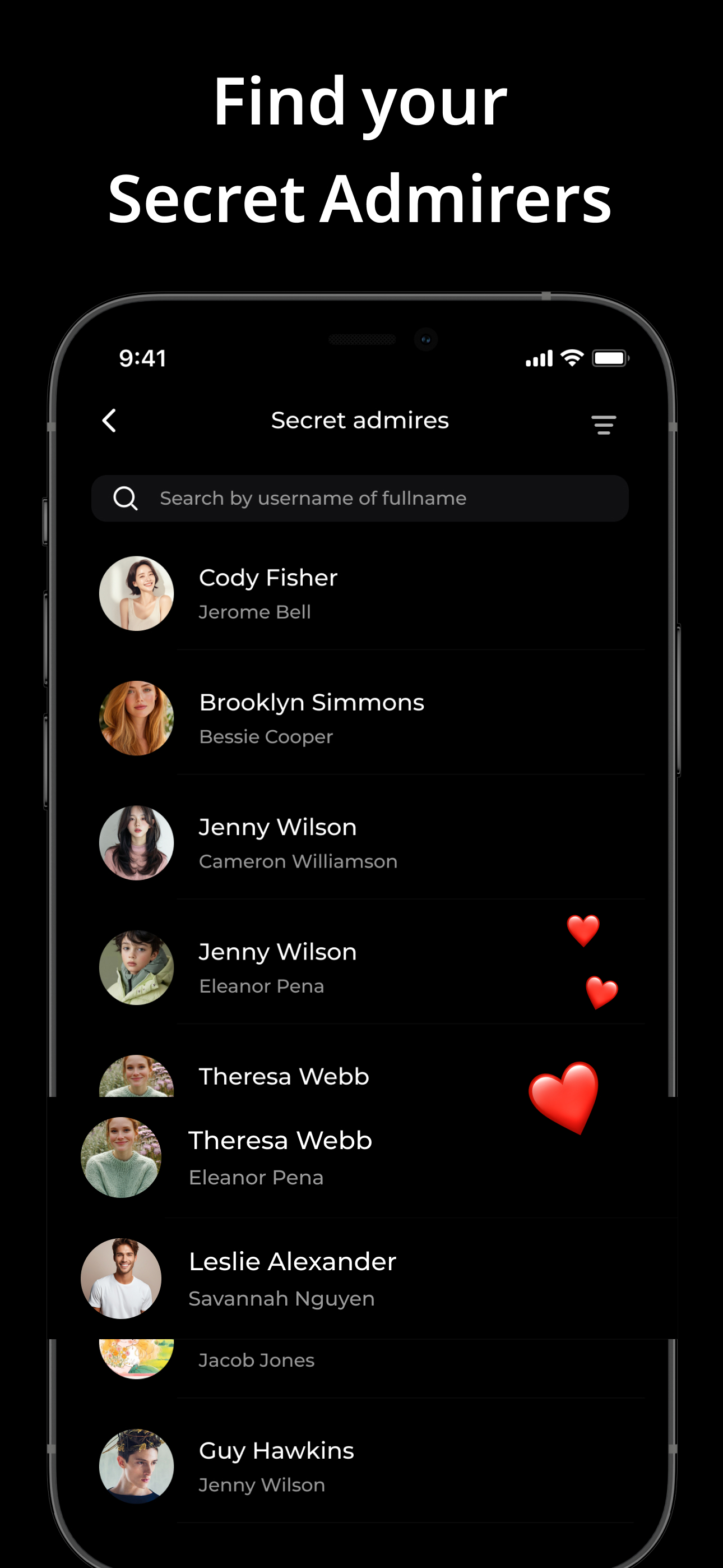
Profile viewers, story viewers, and secret admirer style searches usually point to attention signals.
Reports helps you review repeat viewers, profile interest, and story activity in one Instagram reports app instead of chasing vague promises.
- Check profile viewers and repeat attention
- Review story activity as an audience signal
- Keep the value concrete for daily creator use
Ghost followers and who is not following me back are really cleanup questions.
Reports helps creators review follower changes, quieter follower patterns, and not-following-back lists so account cleanup feels faster and less manual.
- Review not-following-back lists in one place
- Spot quieter ghost-follower style patterns
- Track follower movement over time
Who blocked me on Instagram is a common search, but the better promise is trackable reports.
Reports is positioned around real Instagram tracker signals such as follower changes, profile viewers, story activity, and audience snapshots rather than private claims it cannot verify.
- Use trackable follower and viewer signals
- Avoid overpromising private account data
- Set clearer expectations before install or upgrade
Redeem preview
See how App Store activation works before you ever pay.
The full redeem guide lives inside the purchase flow, but the path stays simple: buy on the separate Plans page, return for the code, and redeem on iPhone through the App Store.
Review the short version here, then open the full guide when you are ready.
1
Buy Pro from the plans page.
Pick the access window you want, confirm the purchase email, and continue to secure Stripe checkout.
2
Return there for the code.
The purchase result page shows the plan, email, order details, and App Store code together.
3
Open the App Store on iPhone or iPad.
Tap your profile icon, then open Redeem Gift Card or Code and enter the code manually.
4
Tap Redeem, then open Reports again.
Use the same Apple ID that redeemed the code on the device where you want Pro active.
Know the small details before you buy.
- Redeem happens in the App Store on iPhone or iPad, not on the website
- Use the Apple ID you use for Reports when redeeming the code
- The full step-by-step guide and tips live on the purchase flow pages
Support and purchase lookup both live with the checkout flow.
If payment succeeds but the code, redemption, or order recovery needs help, the result page and Find Purchase page keep those next steps easy to reach.
Before you install or buy
Review the app, the legal pages, and the purchase path before you commit.
This homepage is where you review the product. The separate Plans, payment result, and purchase lookup pages handle the transaction path when you need them.
Store, privacy, terms, support, and the purchase center in one place.
Review the essentials before you install or buy so the next step feels straightforward.
Each page now does one job well.
- Use the homepage to decide whether Reports fits your workflow
- Use Plans to compare weekly, monthly, and yearly Pro access
- Use the result page to review payment status and copy the code
- Use Find Purchase later if you need to recover an order by email
FAQ
Questions before you install or open the plans page?
A few quick answers about Pro access, redeem codes, and what you can track in Reports.
What does Reports help me track?
Reports helps you check follower changes, story activity, profile viewers, audience snapshots, and not-following-back lists in one app.
What does Pro unlock?
Reports Pro unlocks 50+ profile analytics, deeper profile viewer details, multiple accounts, repost tools, profile activity tracking, privacy protection, and a cleaner ad-free experience.
Why move checkout to a separate page?
It keeps the homepage focused on product value while giving pricing, payment, code delivery, and purchase recovery their own cleaner flow.
How does the web purchase work?
You open the separate Plans page, choose a plan, confirm the purchase email, continue to secure Stripe checkout, then redeem the App Store code on iPhone after payment.
Can I recover an old purchase later?
Yes. The separate Find Purchase page includes email-based lookup so older orders and codes can be recovered from the same place.
Can Reports help with ghost followers or who is not following me back?
Yes. Reports helps with follower changes, quieter follower patterns, and not-following-back lists so creators can review ghost-follower style cleanup and account movement in one place.
Does Reports show who blocked me or secret admirers?
People often search for who blocked me on Instagram or secret admirers. Reports is positioned around trackable signals such as follower changes, profile viewers, repeat story viewers, and not-following-back lists rather than private claims it cannot verify.
Where can I review privacy, terms, and support?
You can open the privacy policy, terms, app support page, and live App Store listing directly from this page before you buy or install.
Support stays easy to reach before or after purchase.
If payment, redemption, or code recovery ever needs help, use the same checkout email when you contact support or when you search Find Purchase.
Keep the homepage simple, then open Plans only when you want to compare access.
Pricing, payment, result handling, and purchase recovery now live on their own pages so the marketing page stays focused.